EV charging & app startup
Free
Voltra
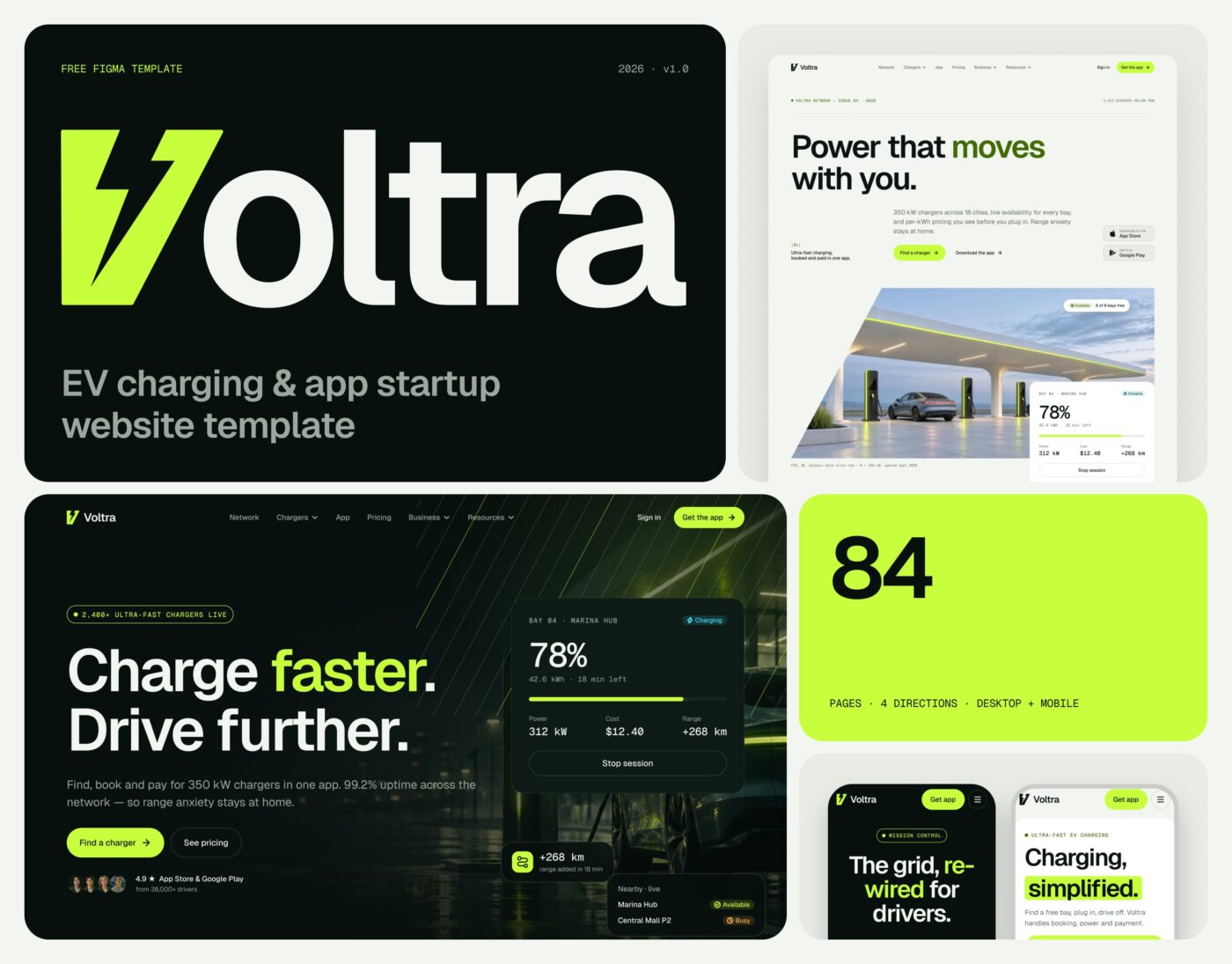
Voltra is a Figma website template for EV charging networks, mobility apps and tech startups. It ships four complete site directions — Cinematic Dark, Editorial Light, Orbit Dark and Bento Light — each with the same 21 pages in desktop and mobile, built from one set of tokens, text styles and components. Swap the accent mode or a few primitives and every page rebrands at once.
Free · CC BY 4.0 · Lifetime updates
- VERSION
- v1.0
- PAGES
- 21
- BREAKPOINTS
- 1440 / 390
- PLATFORMS
- Figma
- LICENSE
- CC BY 4.0
Click any image to open the full-size gallery
Overview
Four complete website directions on one token-driven design system.
Voltra is a Figma website template for EV charging networks, mobility apps and tech startups. It ships four complete site directions — Cinematic Dark, Editorial Light, Orbit Dark and Bento Light — each with the same 21 pages in desktop and mobile, built from one set of tokens, text styles and components. Swap the accent mode or a few primitives and every page rebrands at once.
What’s included
- 4 home directions on one design system — dark and light
- 21 pages per direction, desktop 1440 + mobile 390
- 279 frames incl. form, empty and scrolled states, intros and overlays
- 29 component sets with tone, size and state variants + 90 icons
- 137 variables: Dark/Light theme, 4 accent modes, desktop/mobile type, motion tokens
- 27 text styles on Geist + Geist Mono, 8px grid
- Animated prototype with 12 named flows
- Overview, Getting started and page index
Included pages
- Home
- Network
- Station detail
- Chargers
- Charger detail
- App
- Pricing
- Business
- Get a quote
- Thank you
- About
- Careers
- Job detail
- Blog
- Article
- Help center
- Contact
- Changelog
- Privacy & Terms
- Licenses
- 404
Perfect for
- EV charging networks and mobility services
- Mobile-app and tech-product startups
- SaaS and platform landing sites
- Energy, cleantech and smart-infrastructure companies
- Fleet, logistics and B2B service providers
- Hardware or IoT product launches
Inside Voltra
Everything you need,
nothing you’ll delete.
- Screens
- 279
- Desktop 1440 + Mobile 390, incl. form, empty and scrolled states.
- Home directions
- 4
- Cinematic Dark, Editorial Light, Orbit Dark and Bento Light.
- Component sets
- 29
- Tone, size and state variants, plus 90 icons.
How to use it
From file to live site in three steps.
- 01
Open it in Figma
Click Get it free and duplicate the file to your drafts.
- 02
Make it yours
Change the brand color and fonts in the variables — every page follows.
- 03
Launch
Build it in Framer (remix when available) or hand it to your developer.
Every uilix template
Built like a product, not a mockup.
Real design system
Variables with code syntax, text styles and components with every state.
Desktop + Mobile
Every page at 1440 and 390, built section by section.
Animated prototype
Intros, hovers, menus and flows ready to present.
Real content
Written copy and real layouts — nothing to replace.
Docs inside
A getting-started page that explains the file in minutes.
Updates
Fixes and new pages land on the same Community file.
Changelog
Kept up to date.
v1.0
LatestFirst release on Figma Community.
Can I use Voltra for client work?
Yes. It is licensed under CC BY 4.0 — commercial use is fine as long as you keep the credit included in the file.
Is there a Framer version?
Not yet. Join the newsletter to hear when it’s ready.
Which fonts does it use?
Voltra uses Geist + Geist Mono — free on Google Fonts.
Are the templates free or paid?
Some are free and some are paid — every template shows its price. Free templates stay free.
Is this a subscription? Will I be charged again?
No. Paid templates are a one-time payment — no subscription, no recurring charges.
Do I get updates?
Yes. Every template includes all future updates, for life, at no extra cost.
Do I need a paid Figma or Framer plan?
Figma: a free account is enough to duplicate and edit the file. Framer: you can remix and edit on the free plan; publishing on your own domain needs a paid Framer site plan.
Are the templates beginner-friendly?
Yes. Every file is organized around a design system with a getting-started page — no code needed.
Are there Arabic templates?
Yes — Wajha and Marsa are fully Arabic and right-to-left. More are on the way.
What’s your refund policy?
Because templates are digital files, we don’t refund change-of-mind purchases. If a template is broken or not as described and we can’t fix it, contact us within 14 days of purchase for a full refund.