Creative studio
Free
Merko
A website for creative and design studios: editorial pages, case studies and a journal on one design system — Desktop 1440 and Mobile 390, with an animated prototype.
Free · CC BY 4.0 · Lifetime updates
- PAGES
- 16
- BREAKPOINTS
- 1440 / 390
- PLATFORMS
- Figma, Framer
- LICENSE
- CC BY 4.0
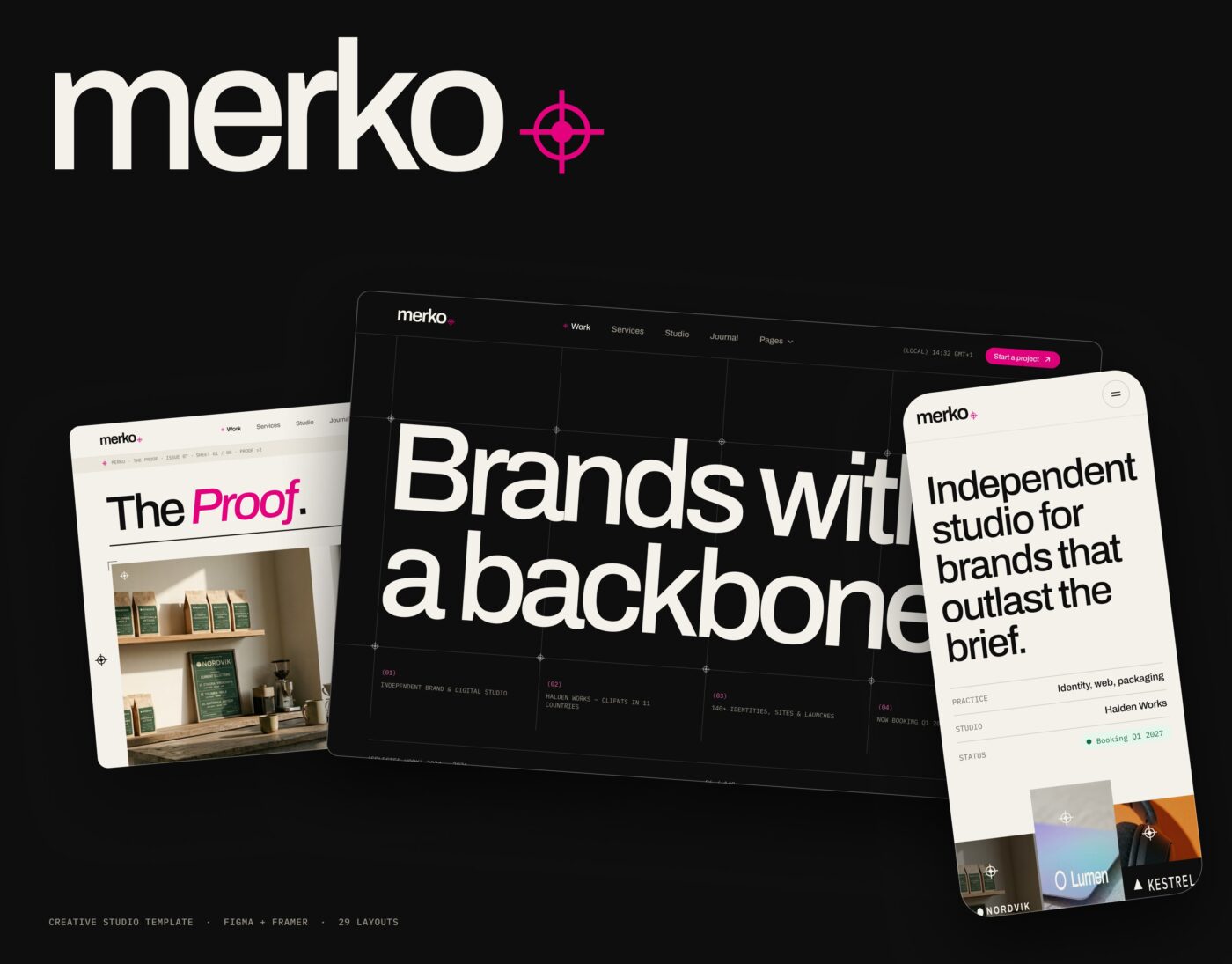
Click any image to open the full-size gallery
Overview
A studio site that lets the work lead.
Merko is built for creative and design studios that want their projects to do the talking: bold editorial layouts, case studies and a journal on one design system.
Change the brand color and type once, swap in your own work, and launch on Figma or Framer — with desktop and mobile pages and an animated prototype ready to present.
What’s included
- Five home directions: Studio, Solo, Proof, Monolith and Gallery
- Work in three layouts: grid, index and showcase
- Case studies in two directions: editorial and immersive
- Services, About, Pricing and Journal — two directions each
- Article pages, Careers with role details, and Contact with a brief builder
- Licenses, Legal, Style guide, Thank-you and 404 pages
- Design system: 169 variables, 24 text styles, 38 component sets
- Desktop 1440 + Mobile 390 for every page (58 screens)
- Animated prototype: 14 flows with intro animations
Included pages
- Home
- Work
- Case study
- Services
- About
- Pricing
- Journal
- Article
- Contact
- Careers
- Career details
- Licenses
- Legal
- Style guide
- Thank you
- 404
Perfect for
- Design and branding studios
- Creative agencies
- Independent designers
- Architecture and interior studios
- Photography and production studios
Inside Merko
Everything you need,
nothing you’ll delete.
- Layouts
- 29
- Every key page in two or more directions.
- Home directions
- 5
- Studio, Solo, Proof, Monolith and Gallery.
- Component sets
- 38
- Every state included.
How to use it
From file to live site in three steps.
- 01
Open it in Figma
Click Get it free and duplicate the file to your drafts.
- 02
Make it yours
Change the brand color and fonts in the variables — every page follows.
- 03
Launch
Build it in Framer (remix when available) or hand it to your developer.
Every uilix template
Built like a product, not a mockup.
Real design system
Variables with code syntax, text styles and components with every state.
Desktop + Mobile
Every page at 1440 and 390, built section by section.
Animated prototype
Intros, hovers, menus and flows ready to present.
Real content
Written copy and real layouts — nothing to replace.
Docs inside
A getting-started page that explains the file in minutes.
Updates
Fixes and new pages land on the same Community file.
Can I use Merko for client work?
Yes. It is licensed under CC BY 4.0 — commercial use is fine as long as you keep the credit included in the file.
Is there a Framer version?
Yes — use Remix in Framer on this page.
Which fonts does it use?
Merko uses Archivo + IBM Plex Mono.
Are the templates free or paid?
Some are free and some are paid — every template shows its price. Free templates stay free.
Is this a subscription? Will I be charged again?
No. Paid templates are a one-time payment — no subscription, no recurring charges.
Do I get updates?
Yes. Every template includes all future updates, for life, at no extra cost.
Do I need a paid Figma or Framer plan?
Figma: a free account is enough to duplicate and edit the file. Framer: you can remix and edit on the free plan; publishing on your own domain needs a paid Framer site plan.
Are the templates beginner-friendly?
Yes. Every file is organized around a design system with a getting-started page — no code needed.
Are there Arabic templates?
Yes — Wajha and Marsa are fully Arabic and right-to-left. More are on the way.
What’s your refund policy?
Because templates are digital files, we don’t refund change-of-mind purchases. If a template is broken or not as described and we can’t fix it, contact us within 14 days of purchase for a full refund.